Crew Office: a 3D office for my AI crew
A private 3D toy-diorama office that runs on my MacBook and shows my Claude Code crew at work, live. One glance says who is working, on which project, and who needs me.
I ship software by directing a named AI crew in Claude Code: Kai on engineering, Mochi on QA, Knope on project management, Amy on finance, Frank on growth, Clio on research and Argus on security. On a busy day there are several sessions open at once, each calling in helpers, and the only way to know who was doing what was to click through every window. A crew I could not see was a crew I could not direct.
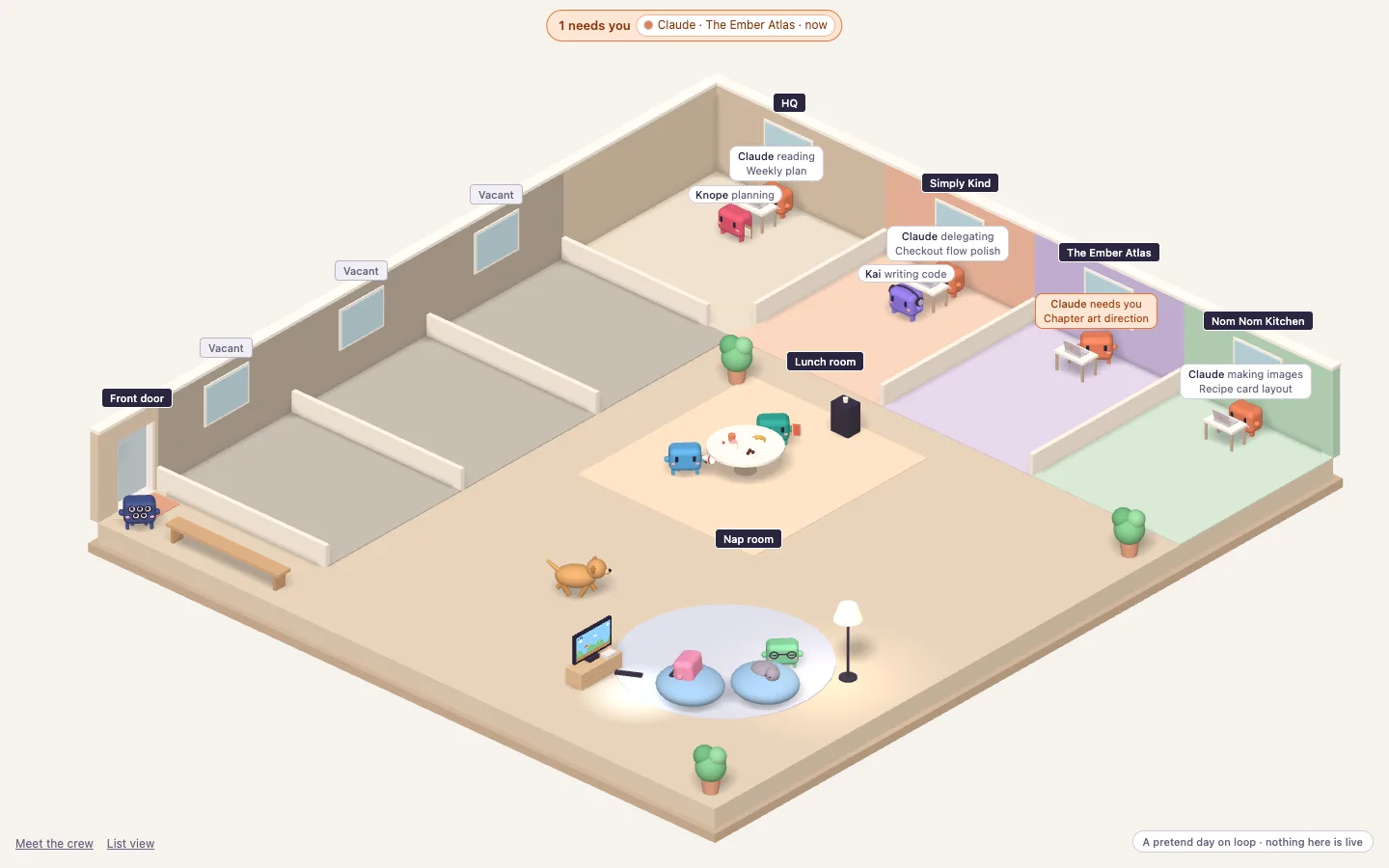
So I built them an office. Crew Office is a 3D toy diorama that starts at login and lives in the Dock as its own app. Every live session is a little Claude at a desk in that project's room. The crew walk over when a session calls them and hang out in the lounge when it does not. Helper agents come in through the front door as temps and leave when they are done.
The glance test
The brief I set was a glance test. Within about three seconds of looking, I should know who is working, on which project, and who needs me. Everything in the design serves that: a courtyard floor plan with a room per project, tags that say what matters and nothing else, and one loud colour, orange, reserved for anyone waiting on me. A Dock badge carries the same count, so I see it even when the office is behind other windows.
Each state had to read from across the room, so each one got a pose, not just a label.
- Working
Tapping at the laptop, gently bobbing. The tag says the live verb: writing code, reading, researching.
- Needs you
Stands up, turns to face you and bounces, arms flapping. Orange tag, and the Dock badge counts them.
- Your turn
Leans back with a steaming cuppa.
- Snag
Slumped under a little rain cloud. An account-wide snag puts a storm over the whole office.
- On a break
Walks to the lunch table or the nap corner, and back when work resumes.
- Heading home
Out through the front door, with a wave.
The six states, and how each one looks. The pose does the talking before the tag does.

The cast
Everyone is Clawd, Claude Code's mascot, as a soft toy: a rounded body, two tall eyes, blush, stubby arms and four little legs. Each crew member is the same Clawd in a signature colour with one prop. Kai wears headphones, Amy wears glasses, Mochi holds a magnifier, Clio a book, Knope a clipboard and Frank a megaphone. Argus is navy with five googly eyes, and guards the front door when nobody needs him. Temps are yellow with orange caps. Cookie and Rayray, my real dog and cat, wander the lounge.
It is a status screen, and it is also a toy I like glancing at. That is the point. A tool you enjoy looking at is a tool you keep open.
Meet the crew

The second page is for showing people. Claude and the crew stand in a line-up like a team photo. Pick someone and they step forward, hop and wave, and a card says who they are: role, mission, what they are good at, how they work, and what they are doing right now. Nothing on the page names a session, so it is safe on a shared screen. It works by keyboard, in reduced motion, and as a plain list when 3D cannot start.
Built to stay out of the way
The office watches Claude Code through its hooks, and a hook that slowed a session or leaked a prompt would be worse than no office. So the hook keeps about a dozen safe fields, never a prompt, a file or a reply, prints nothing and costs about four milliseconds per event. The server listens on the laptop only, checks where every request comes from, and runs under Node's permission model so it can read the event log and not much else. Argus reviewed the hook, the server and the settings change before any of it went live.
Animation stops when the window is hidden, reduced motion swaps walks for fades, and the plain list view was the first thing that worked. The data was right before any 3D was drawn.

Where it's at
Crew Office went from the first sketch to an installed app in ten days of evenings and weekends, in four tested slices: the plumbing, the brain, the office, and Meet the crew. It has run on my Mac since October 2026 and replaced window-hopping with a glance. The side panel with this week's value delivered is next.
It is also the first project where the crew shipped its own workplace. Kai reviewed every pull request, Mochi ran the QA passes and Argus signed off on the hook. The office they work in is the one they helped build.